
A macOS utility for music production
Make room. Keep the music.
Find caches, installers and leftovers you can review. Clean Space protects the DAW projects, libraries and plug-ins it recognizes.
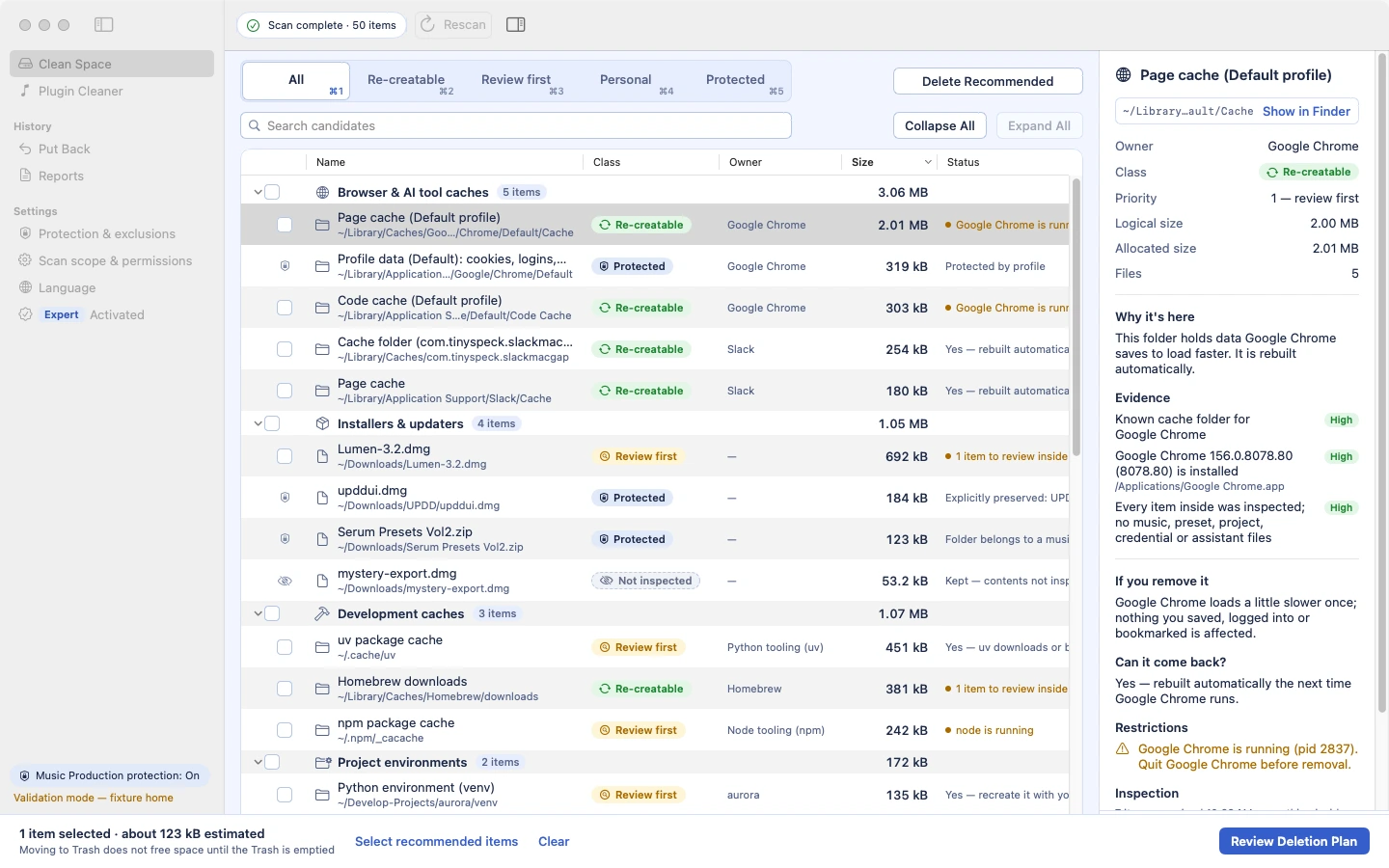
See what goes before it goes.
A cleanup starts with a scan. You decide what goes into the plan and confirm before anything moves.
Scan
Find caches, old installers and other storage candidates. See size and status by source.
Review
Open the inspector to read why an item is here and what could happen if it goes.
Confirm
Check the plan and authorize the action. Clean Space checks the items again before removal.
Clean Space is built for a musician's Mac. It finds the caches, installers and leftovers you can remove, explains why each one is safe to delete, and excludes the music production files its protection rules recognize.
Built around your sessions.
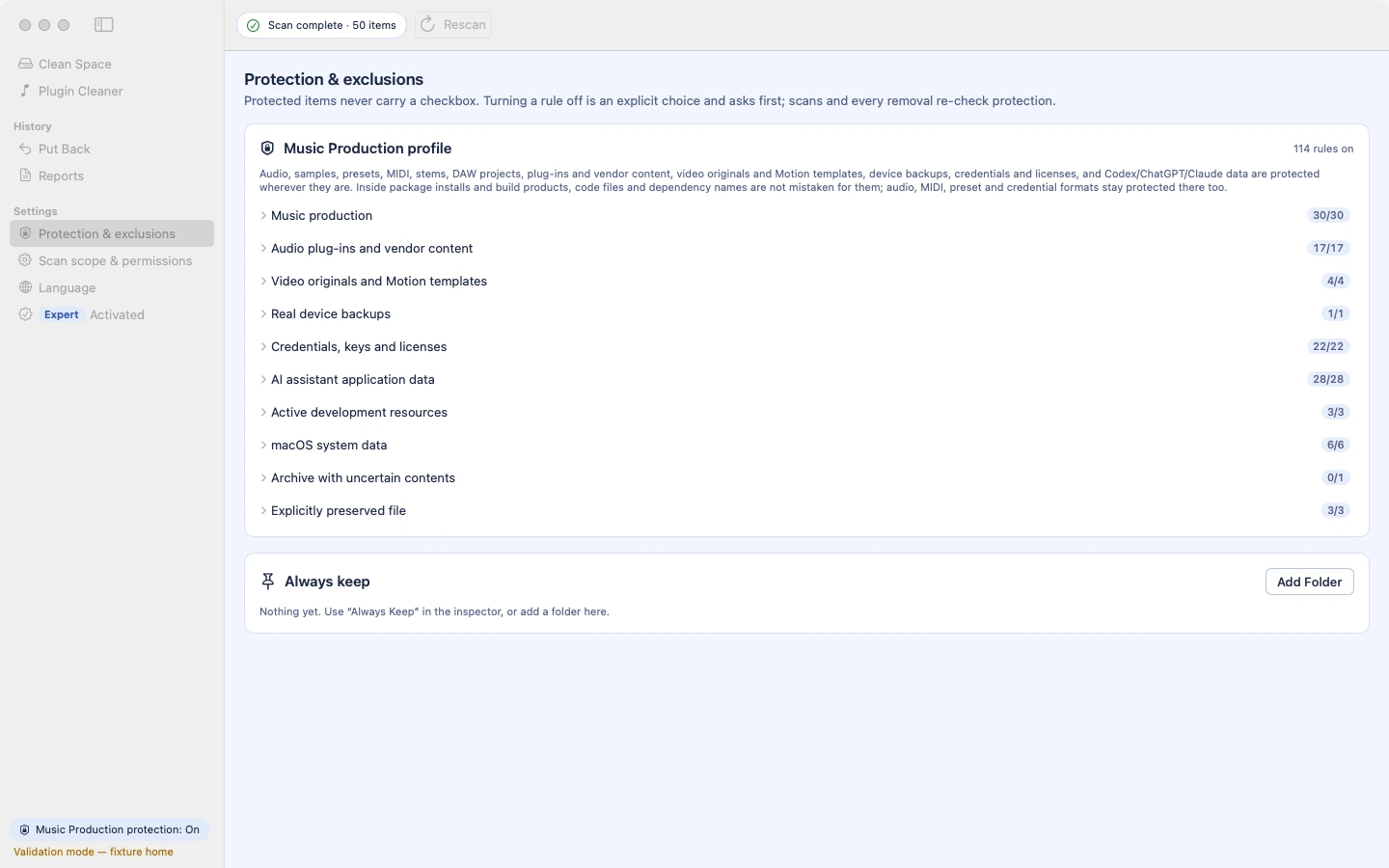
The Music Production profile protects files it recognizes. Review the reasons and add your own Always keep entries.
| Projects | Logic Pro projects and Ableton Live sets |
|---|---|
| Libraries | Recognized sample libraries and Kontakt content |
| Sounds & tools | Presets, stems and audio plug-ins |
What the protection rules cover
Music production files that match the default protection rules are excluded from removal. The rules recognize these formats and folders wherever the scan finds them, including inside caches, downloads, package folders and build products.
Audio and stems
WAV, AIFF, FLAC, MP3, M4A, CAF and the other audio formats the rules list.
Sample libraries and instruments
Kontakt, EXS, SFZ and SoundFont files, REX loops and other sample library formats.
Presets, patches and MIDI
Plug-in presets and banks, SysEx dumps and MIDI files.
DAW projects
Projects from Logic Pro, GarageBand, Cubase, Ableton Live, Pro Tools, FL Studio, Studio One, Bitwig Studio and Reaper.
Plug-ins and vendor content
VST, VST3, Audio Unit, AAX and CLAP plug-ins, and the content folders of sample and plug-in makers.
Your music folders
Your Music folder, ~/Library/Audio and /Library/Audio, your Splice folder, and any folder named after a DAW, a sound library or words like presets, stems, loops or sample packs.
Protected items never get a checkbox, and a folder that holds protected content can't be removed as a whole. One audio file inside a ZIP in a cache keeps the whole cache. ZIP and tar archives in your Downloads are listed before they are offered: a sample pack that holds audio, presets or projects stays, and an archive that can't be read is kept as not inspected. Video originals, device backups, credentials and AI assistant data are covered too.
Where the rules stop
The rules are a strong default, not a guarantee. Check each item's reason before you approve a plan.
Archives it can't open
Inside a cache, ZIP-family archives are opened and checked. Other types, such as tar, gz, 7z, rar, dmg and pkg, aren't opened, so a cache that holds one is marked to review first: it is never recommended, but you can still select it yourself.
Files the rules don't recognize
Formats and folder names the rules don't list aren't protected by them. Add any folder you always want kept with Always Keep.
Rules you turn off
You can turn a rule off in Protection & exclusions. The app asks first, and the files that rule covered can then be selected.
Start free. Unlock Expert.
Both editions use the same music protection and review controls.
| What you can do | Free | Expert |
|---|---|---|
| Scan and review everyday candidates | Included | Included |
| Remove supported caches and installers | Included | Included |
| Review hidden folders and use Plugin Cleaner | Locked | Included |
364 days Unlock
₩3,300 (VAT included), or US$2.49 with PayPal: one payment on cultureand.tech through Toss Payments, signed in to your Culture & Tech account. Access period: 364 days from the moment the payment is approved (shorter than 12 months), ending at the same time of day. It doesn't renew, and nothing is charged again.
Full refund within the applicable seven-day period, even after use. After that, cancel during the original 364-day term for an unused-period refund without a fee. Only the refunded order's access ends. Details and email requests are in the product's Refund Policy. When the access period ends, the basic features stay, and so do your settings, history, reports and Put Back.
Test payment: payments run in Toss Payments' test environment for now, and nothing is actually charged. An access period received through a test payment ends when sales start for real. The two editions are separate products: Expert bought in the Mac App Store doesn't unlock the website edition, and the 364 days Unlock doesn't unlock the Mac App Store app.
Buy the 364 days UnlockStorage guides
All guidesHow to clear System Data on a Mac safely
Understand the categories before you remove files.
Library cachesWhich Mac Library cache files are safe to delete?
Review specific locations and the cautions for each.
Frequently asked questions
Will it delete my sample libraries, presets or projects?
Music production files that match the default protection rules are excluded from removal: audio, samples, presets, MIDI, DAW projects and plug-ins get no checkbox, and a folder that holds them can't be removed as a whole. The rules have limits. A cache that holds an archive type the app can't open is marked to review first and can still be selected by hand, and a rule you turn off stops protecting its files. Check each item's reason before you approve a plan.
Does it delete anything on its own?
No. Scanning only reads, and nothing is selected by default. You approve a fixed plan with Touch ID or your login password, and each item is checked again right before it is removed.
Does everything go to the Trash?
Regular cleanup moves items to the Trash by default. Deleting items that are already in the Trash is permanent, and the plan marks them that way before you confirm it. With Expert you can also choose permanent deletion instead of the Trash.
What is the difference between Free and Expert?
Free moves browser and app caches, installers and development caches to the Trash and can permanently delete items already in your Trash; it shows Expert items with their sizes, locked. Expert, a one-time in-app purchase, adds more sources such as project environments, Xcode build caches and Final Cut Pro render files, plus permanent deletion instead of the Trash, a deeper scan and duplicate verification. The safety features are the same in both.
Does it send anything about my files anywhere?
No. Files and scan results are processed on your Mac and are not uploaded to our servers. The Mac App Store app has no account, and Apple handles Expert purchases. The website edition's account is used only for the 364 days Unlock: it checks your access period and sends no file names, paths or scan results.
What is the 364 days Unlock?
One payment of ₩3,300 (VAT included) or US$2.49 on cultureand.tech that unlocks every feature of the Clean Space website edition for 364 days from the moment the payment is approved. It doesn't renew, and the basic features stay after the access period. It is for the website edition only, not the Mac App Store app.
What do I need to run it?
A Mac with macOS 14 or later. It asks once for access to your home folder, and Full Disk Access is optional.
Can I get it now?
Yes: download the website edition from this page. Its Mac App Store listing is being prepared, and this page will link to it once it is available.
Download Clean Space for Mac
Clean Space also comes as a download from this site, signed with our Apple Developer ID and notarized by Apple, for macOS 14 or later (Apple silicon or Intel). It is free to download and use with its basic features, and one paid option, the 364 days Unlock, unlocks every feature.
Mac App Store privacy policy